Digital Products
Etsy Printables Business Guide 2026: What to Sell, Fees, Setup and Realistic Expectations
How to start an Etsy printables and digital downloads shop in 2026: product ideas, Etsy fees, a 5-step setup, listing checklist, competition risks and alternatives.
By Md Mahfuj HossainPublished 5 min read

Quick answer: An Etsy printables shop sells digital downloads such as planners, templates, worksheets and wall art with no inventory or shipping. Etsy's listed fees (US) in one 2026 comparison are a $0.20 listing fee (lasting four months or until sold) and a 6.5% transaction fee, plus payment processing, so a $20 sale costs about $1.50 before processing. The challenge is not cost but competition and search visibility, so choose a narrow niche and build quality bundles rather than uploading hundreds of generic files.
Key takeaways
- Low cost, high competition. Standing out needs a niche and quality.
- Fees are small per sale; time and design effort are the real cost.
- Do not copy other sellers' designs or use licensed characters and fonts without rights.
- Diversify: use Etsy for discovery and an email list to keep customers.
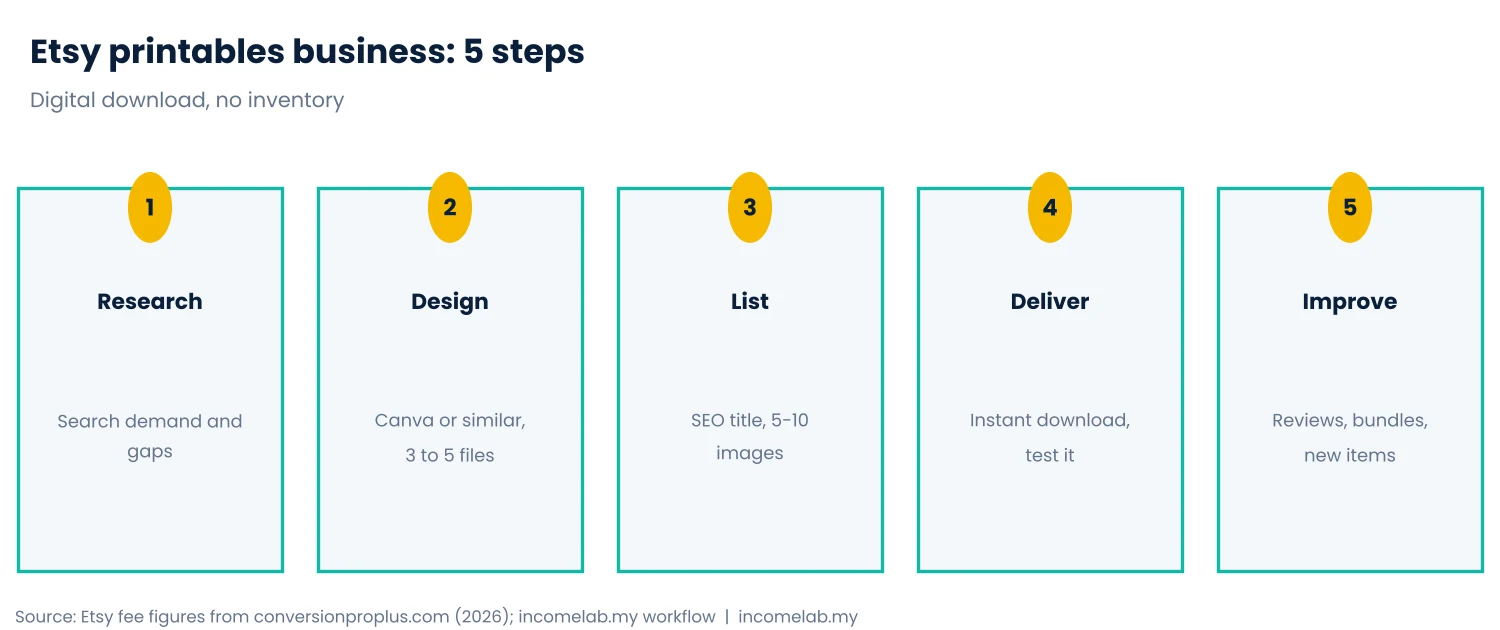
Figure 1. A five-step path from idea to improving a live shop.
What sells as a digital download?
| Category | Examples | Notes |
|---|---|---|
| Planners and trackers | Budget, habit, meal, freelance invoices | Evergreen but crowded |
| Templates | Resume, social media, invoice, notion-style | Skill-based, higher value |
| Worksheets and education | Study guides, lesson plans | Check licensing and accuracy |
| Wall art | Quotes, prints | Very crowded |
| Business kits | Brand guidelines, client onboarding | Higher price points |
| Party and event | Invitations, signs | Seasonal |
Look for gaps: underserved roles (freelance bookkeepers, ESL teachers), regions or formats.
Fees on a $20 sale
| Item | Cost |
|---|---|
| Listing fee | $0.20 |
| Transaction fee (6.5%) | $1.30 |
| Total before payment processing and ads | $1.50 |
Payment processing varies by location, and ads or currency conversion can add costs. Compare with other platforms, such as Gumroad (10% plus $0.50 on direct sales in one source) or Payhip.
Step-by-step setup
1. Research
Search Etsy for your idea, note top sellers, price, review count and complaints. Look for gaps you can fill better.
2. Design
Create 3 to 5 launch files in a design tool. Check legal basics: use fonts and graphics you have rights to, and avoid trademarks and copyrighted characters.
3. List
- Clear title with the keyword buyers search.
- 5 to 10 images: preview, mockups, what is included, how to use.
- Plain description: file types, sizes, what is not included, refund policy.
- Tags that match search terms.
4. Deliver
Test the download yourself. Provide simple instructions and a PDF with links if needed.
5. Improve
Study listing stats, add bundles, update designs, respond to reviews and add related products.
Listing checklist
- Title includes a buyer keyword.
- First image shows the product clearly.
- File formats and sizes stated.
- Licence terms (personal vs commercial) stated.
- Preview mockups are accurate.
- No claims you cannot support.
- Refund or support message ready.
Risks and how to reduce them
| Risk | Mitigation |
|---|---|
| Competition | Niche down, create bundles, add real value |
| Policy changes | Keep an email list and your own site |
| Copyright claims | Only use assets you own or license |
| Low sales at first | Plan months of iteration |
| AI-generated sameness | Add original design and editing; follow platform rules |
Etsy vs your own store
| Etsy | Own store (Payhip, Gumroad, Shopify) | |
|---|---|---|
| Traffic | Built-in search | You bring it |
| Fees | Listing and 6.5% plus processing | Varies; see comparison |
| Branding | Limited | High |
| Customer data | Limited | Yours |
| Best for | Starting without an audience | Scaling with an audience |
Many sellers start on Etsy and move repeat buyers to their own list.
Illustrative example (not a real person)
A seller creates a "client onboarding kit" for freelance designers (welcome email, questionnaire, contract checklist) priced at $24 and lists three variations. If it sells 20 copies a month, gross is $480 less about $1.80 a sale in fees before processing. These numbers are invented to illustrate the arithmetic, not a forecast.
Frequently asked questions
How much does it cost to start an Etsy printables shop?
Low. Etsy's listing fee is $0.20 per listing in the US, plus a transaction fee of 6.5%. You also need design tools and time.
What sells best as Etsy digital downloads?
Planners, templates, worksheets and niche business kits sell widely, but all are competitive. Niche and quality matter.
Is Etsy printables still profitable?
It can be, but competition is heavy. Results vary widely and there are no guarantees.
Do I need a business license?
It depends on your country and income. Check local rules and tax obligations.
Can I use Canva for Etsy products?
Many sellers do, but follow Canva's licensing rules for selling designs and avoid reselling templates in ways the terms prohibit.
Can I sell AI-generated art on Etsy?
Etsy has policies for AI-generated items and descriptions. Check current rules and disclose where required.
How do I get my first sale on Etsy?
Optimise titles and images, price competitively, add reviews gradually and share with your own audience.
How do I protect my files from being copied?
Perfect protection is not possible. Use watermarked previews and licences, and focus on service and updates.
Should I sell on Etsy or my own site?
Start where buyers already are (Etsy), then build your own list and store as you grow.
How long does it take to make money on Etsy?
It varies. A published comparison puts digital products at 1 to 8 weeks to a first sale, but building steady income takes longer.
Sources
- Gumroad vs Etsy vs Shopify for digital products 2026, ConversionPro+ (opens in a new tab)
- Gumroad vs Payhip vs Lemon Squeezy 2026, WeAreFounders (opens in a new tab)
- 15 Legit Ways to Make Money Online in 2026, Digistore24 (opens in a new tab)
Fees checked October 2026 on third-party pages and change; verify on Etsy. Not legal or tax advice.
- etsy
- printables
- digital downloads
- passive income
- canva
Keep reading

Digital Products
KDP Low-Content Books in 2026: Royalty Math, Print Costs, Niche Validation and Rules
How Amazon KDP low-content and puzzle books work in 2026: royalty formulas with worked examples, print cost table, niche validation steps, AI disclosure rules and realistic expectations.

Digital Products
Print-on-Demand Platforms Compared in 2026: Printful vs Printify vs Merch by Amazon vs Redbubble
Compare Printful, Printify, Merch by Amazon and Redbubble for print-on-demand sellers in 2026: costs, margins, control, pros and cons, and how to choose by experience level.

Digital Products
Where to Sell Digital Products in 2026: Gumroad, Etsy, Payhip, Lemon Squeezy and More Compared
Compare the fees, tax handling and best use cases of Gumroad, Etsy, Payhip, Lemon Squeezy, Polar, Stripe and Shopify for selling ebooks, templates and digital downloads.
Digital Products
Party invitation prompts that leave room for the words
One image prompt that locks the occasion, theme, colours, and a clean area for the words, plus a listing draft you must match to the real file.