Loading ebook details...
AI / Content creation
The Faceless Content Studio
Make Short Videos and Carousels with AI Without Showing Your Face
4.9(59)
|Editorial review 4.5/5The problem
Being on camera is uncomfortable for many creators, while generic AI video tools produce repetitive, low-value spam that gets flagged or demonetized by platforms.
Who it's for
Creators, small business owners, affiliates, and freelancers who want to create video and carousel content without appearing on camera.
The method
Niche Originality Test -> 3-Hook Scripting -> B-Roll & Visual Sourcing -> CapCut/Canva Assembly -> Policy Compliance Check
Inside this book
- 19chaptersOne method, explained step by step
- 30day planA small action for every day
How the method works
Niche Originality Test -> 3-Hook Scripting -> B-Roll & Visual Sourcing -> CapCut/Canva Assembly -> Policy Compliance Check: the path the book takes you through, step by step.
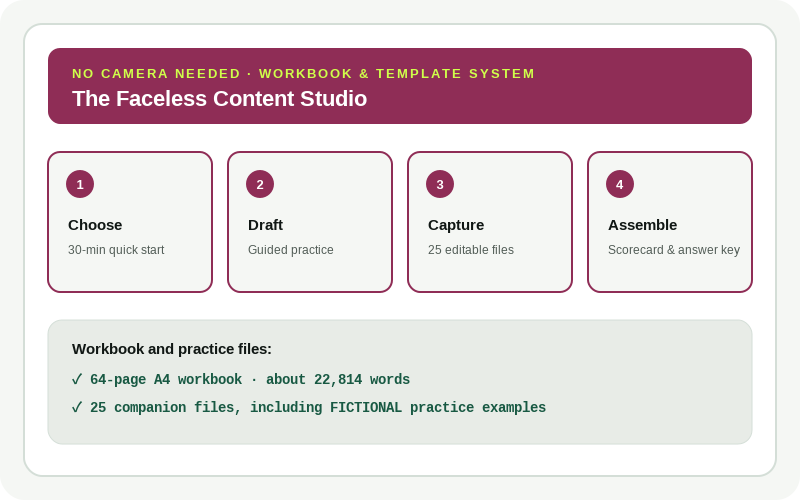
- ChooseDefine an audience problem and inspect the evidence you can demonstrate.
- DraftWrite and fact-check scripts, then time the real read.
- CaptureRecord permitted visuals and voice, retaining asset and privacy checks.
- AssembleEdit, preview on a phone and review applicable disclosure requirements.
What you'll be able to do
Plan, script and assemble a practice batch of three short videos and two carousels, with source, rights and disclosure checks. Production time, audience results and platform approval are not guaranteed.
Is this book right for you?
Produce engaging short videos and carousels with AI, without ever stepping in front of a camera.
Useful for scripts, storyboards, asset records and review. It supports content planning rather than guaranteed audience growth or passive income.
Skip if you need finished broadcast-quality media or supplied commercial rights. Official destination rules and your actual asset licences control use.
Plan, script and assemble a practice batch of three short videos and two carousels, with source, rights and disclosure checks. Production time, audience results and platform approval are not guaranteed.
Added buyer-guide/ contains an authored fictional source, complete reference decision, deliberate fault and editable review record. Existing tools, sources and licences remain. A file/score/template is not a verified real-world outcome.
Practice outcome
A niche self-assessment and thirty planned ideas with named visual evidence.
Practice outcome
Three timed script drafts, voice and visual plans for a practice batch.
Practice outcome
A workflow for editing three short videos and two seven-slide carousels.
Practice outcome
A rights/disclosure review log and twenty planned production checks.
Practice outcome
An editing-service proposal with input, revision and approval dependencies.
What you can inspect
- All twenty-five companion filenames are present; the original nine filenames and all original chapter headings remain.
- The sixty-hook count, thirty idea rows, fictional niche totals and 180-minute planned budget were checked locally.
- No editing-app account trial, TTS generation, public upload, retention experiment or independent reader trial is claimed.
What's inside
- 66-page revised workbook; ten modules and 23,014 extracted words
- 25 companion files, including all nine original filenames.
- 60 draft hooks, a 30-row idea bank and fictional practice examples.
- 20 production acceptance checks, initially UNTESTED.
- Added buyer guide: specific paid-versus-free judgment, finished fictional comparison case, existing starter-file route and editable review record
Chapters
- 01Start here
- 02The 30-minute quick start
- 03Module 1: Picking a niche and a format that passes the originality test
- 04Module 2: Content pillars and your 30-idea bank
- 05Module 3: Scripting with AI for hooks, structure, and retention
- 06Module 4: Voice options, licensed text-to-speech, and disclosure
- 07Module 5: Visuals, screen recordings, AI images, and stock licensing
- 08Module 6: Editing short videos in CapCut and Canva step by step
- 09Module 7: Building high-save carousels for Instagram and LinkedIn
- 10Module 8: Batching a full week of content in one session
- 11Module 9: Posting, simple analytics, and staying compliant
- 12Module 10: Selling short-form video and carousel editing as a service
- 13Your 14-day plan
- 14Capstone and scorecard
- 15Answer keys
- 16FAQ
- 17Glossary
- 18Sources
- 19Changelog
Read a free sample
No email needed. This is the book's real text, unedited.
Start here
Use this 14-day workbook to plan, script and assemble a practice batch of three short vertical videos and two carousels. The three-hour weekly schedule is a planning target after setup, not a measured completion promise. Record your actual time and reduce the batch size when research or accessibility checks need longer.
You do not need a studio camera, a ring light, or a charismatic on-camera personality to publish useful short-form content. Thousands of software tutorials, local service explainers, book summaries, personal finance breakdowns, and product comparisons work better when the viewer watches a clear screen recording, a clean diagram, or a close-up demonstration instead of a talking head.
At the same time, the old "push-button automated channel" pitch is dead. On July 15, 2025, YouTube updated and renamed its "repetitious content" monetization policy to "inauthentic content" (support.google.com/youtube/answer/1311392, reference; recheck before publishing). That policy targets channels that upload mass-produced, heavily templated, or low-effort automated videos without human editorial input. TikTok, Instagram, and YouTube also require creators to disclose realistic synthetic media and AI-generated content (support.google.com/youtube/answer/14328491 and support.tiktok.com, reference; recheck before publishing).
This book teaches you how to use AI as a fast production assistant while keeping human judgment, original structure, and real utility at the center of every post.
Who this book is for
- Solo creators and educators who want to teach a skill, review tools, or share research on YouTube Shorts, TikTok, Instagram Reels, or LinkedIn without appearing on camera.
- Small business owners and local service providers who need consistent product demos, before-and-after breakdowns, and FAQ posts without hiring a video crew.
- Affiliate marketers who want to publish honest software walkthroughs, physical product comparisons, and buyer guides with proper FTC disclosures.
- Freelancers and virtual assistants who want to package and sell short-form video and carousel editing as a clear monthly service for clients.
Who this book is NOT for
- People looking for a one-click autopilot money machine. If you want to paste a single prompt into a web app and upload 50 unedited AI slop videos a day, do not use this book. Platforms demonetize and suppress mass-produced spam.
- Anyone unwilling to fact-check AI output. Language models invent statistics and misstate tool features. You must verify every claim before you record or export.
- Creators who want to impersonate real people or make deceptive deepfakes. Use the licensing and disclosure checks before publishing; completing a workflow does not establish legal compliance or platform approval.
- People seeking guaranteed income or overnight viral fame. The 14-day plan gives you a sequence for building a practice portfolio; completion depends on your starting skills, tools and available time. It does not promise views, subscribers, or earnings.
Time needed
- 30 minutes today for the Quick Start win (one finished 5-slide PDF carousel and a 45-second video script).
- 60 to 90 minutes per module across 10 modules to build your templates, voice setup, visual libraries, and editing presets.
- 3 hours per week once your studio is running to batch three short videos and two carousels.
What you need (accounts and cost notes)
Use your own recordings, simple shapes and assets you have permission to use for a low-cost practice route. Free features, exports and quotas vary by account; paid tools or licensed assets may be needed for some options. Tool pricing and plan limits change often, so check the current pricing page for each tool before subscribing (recheck the current account and terms before use):
- An AI text assistant: ChatGPT (
chatgpt.com), Claude (claude.ai), or Google Gemini (gemini.google.com). Try a short prompt first and check the account’s current quota; you can also draft the scripts yourself. - A design and carousel tool: Canva (
canva.com). The free plan handles 1080x1350 carousels and basic 1080x1920 video exports. Checkcanva.com/pricingand the Canva Content License Agreement (canva.com/policies/content-license-agreement, reference; recheck before publishing) for differences between Free Content and Pro Content. - A vertical video editor: CapCut Desktop or Web (
capcut.com) or Canva Video. Checkcapcut.com/clause/terms-of-service(reference; recheck before publishing) before using built-in music or templates for business work; stick to assets explicitly marked for "Commercial Use" or bring your own licensed audio. - A screen recorder: OBS Studio (
obsproject.com, free and open-source on Windows, macOS, and Linux) or your operating system's built-in screen recorder. - A voiceover setup:
- Option A (Recommended for originality): Your own voice recorded into a USB microphone or smartphone voice memo app, cleaned up with free noise reduction.
- Option B (Licensed text-to-speech): ElevenLabs (
elevenlabs.io). Note that the ElevenLabs Free plan does not permit commercial use or monetized channels (elevenlabs.io/pricingandelevenlabs.io/terms-of-use, reference; recheck before publishing). If you monetize or work for clients, check their current paid starter tiers for commercial rights.
- Royalty-free stock visuals and audio: Pexels (
pexels.com/license), Pixabay (pixabay.com/service/license-summary), and the YouTube Audio Library (support.google.com/youtube/answer/3376882, reference; recheck before publishing).
How to use this book
Every module follows a strict hands-on loop:
- Read the plain concept and trace the
flowdiagram so you see how the step fits into your studio pipeline. - Study the HYPOTHETICAL worked example to see how a fictional creator or small business applies the exact numbers and settings.
- Copy and customize the
[!PROMPT]blocks in your AI chat tool. - Complete the timed
[!TRY]lab and verify your output against the[!DONE]test right below it. - Fill out the
worksheetblock and answer the## Self-checkquestions at the end of the module. Check your answers in the# Answer keyschapter at the back. - Open
templates/13-companion-file-map.mdfirst, then the companion files in thetemplates/folder as you go. Use the chapter-specific blank layouts and clearly labeled fictional examples. The original nine files remain available. Track the 20 planned production checks intemplates/14-production-acceptance-checklist.csv; all begin UNTESTED.
The 30-minute quick start
Before you set up audio filters or color palettes, get one concrete win on the board. In the next 30 minutes, you will turn one specific question from your field into a 45-second faceless video script and a 5-slide educational carousel in Canva.
Choose question -> Verify answer -> Draft 5 slides -> Build and export -> Check readability
Step 1: Pick one specific "How do I fix X?" question (5 minutes)
Bad faceless content is broad ("5 tips for productivity"). Good faceless content solves one annoying problem in under a minute ("How to stop Excel from turning serial numbers into dates").
Write down one specific mistake beginners make in a tool, hobby, or service you know well.
Step 2: Run the dual-format Quick Start prompt (5 minutes)
Open your AI assistant and paste the prompt below. Replace the bracketed text with your topic.
[!PROMPT] Dual-format 45-second script and 5-slide carousel generator You are a direct technical editor for a faceless educational channel. Topic: [Insert your specific beginner problem, e.g., How to clean a French press without clogging your kitchen sink] Target viewer: [Insert beginner audience, e.g., home coffee drinkers]
Write two assets from this single topic:
- A 45-second vertical video voiceover script (110 to 120 spoken words total). Break it into 5 numbered lines. For each line, give the exact spoken words (under 25 words per line) and a concrete visual instruction showing hands, a screen recording, or a diagram (no talking head). Line 1 must state the problem in under 8 seconds. Line 5 must give a 1-sentence recap.
- A 5-slide carousel outline for a 1080x1350 portrait post.
- Slide 1: Headline (max 8 words) + Subhead (max 10 words).
- Slides 2, 3, and 4: One action step per slide. Heading (max 6 words) + body text (max 22 words).
- Slide 5: Summary checklist of the 3 steps + a plain save prompt ("Save this checklist for your next [task]").
Rules: Use plain words. No exclamation marks. No hype adjectives. Verify that all steps are factually accurate.
Step 3: Fact-check and trim the output (5 minutes)
Read the 5 spoken lines out loud with a stopwatch running on your phone.
- If the read takes longer than 48 seconds at a calm speaking pace, cut adjectives until it lands between 40 and 45 seconds.
- Check every technical step. If the AI invented a menu name or skipped a safety step, fix it with your own knowledge.
Step 4: Build the 5-slide carousel in Canva (15 minutes)
[!TRY] Lab 0: Build and export your first 5-slide carousel (15 minutes)
- Open
canva.comand click Create a design in the top left corner.- Click Custom size, enter 1080 for Width and 1350 for Height (pixels), and click Create new design.
- On Page 1, set the background color to a dark neutral (
#1E1E24) and pressTon your keyboard to add a text box. Set the font to a clean sans-serif (such as Inter or Montserrat Bold), size 64 pt, color white (#FFFFFF), and paste your Slide 1 Headline.- Add a second text box below it at 32 pt, color light gray (
#D1D5DB), and paste your Subhead. Add a small footer at the bottom:Swipe -> 1/5.- In the bottom timeline bar, click the three dots on Page 1 and select Duplicate page four times so you have 5 pages total.
- Paste the text for Slides 2, 3, 4, and 5 from your AI output onto Pages 2 through 5. Update the footer numbers (
2/5,3/5,4/5,5/5).- Click Share in the top right corner, click Download, set File type to PDF Standard (for LinkedIn) or PNG (for Instagram), and click Download.
[!DONE] You have a saved 5-page PDF or 5 PNG files on your computer where every headline is readable on a phone screen without zooming, plus a timed 45-second script ready to record.
[!EXAMPLE] HYPOTHETICAL: Amir's spreadsheet clinic Amir is a freelance bookkeeper in Kuala Lumpur who wants small business clients. For his 30-minute Quick Start, he picks the topic: "How to find duplicate invoice numbers in Google Sheets in 30 seconds."
- Spoken script length: 108 words (42 seconds when read aloud).
- Visual plan: A screen recording of a fictional invoice sheet showing
Format > Conditional formatting > Custom formula is > =COUNTIF(A:A, A1)>1.- Carousel result: A 5-slide PDF titled Spot Duplicate Invoices in 30 Seconds. Slide 3 shows the exact formula inside a high-contrast code box so bookkeepers can copy it.
Version 1.0-r20261109 · changelog
- 1.0 (8 November 2026): First verified release with companion templates and labs. 9 November 2026: revised practical walkthrough, editorial corrections and checked local deliverables.