Loading ebook details...
AI / No-code automation
The No-Code AI Agents Workbook
Six assistant workflows to build, check and adapt in n8n, Zapier or Make
5.0(68)
|Editorial review 4.5/5The problem
Inbox triage, research and meeting follow-up involve messy text and repeated handoffs. A useful workflow needs clear field mappings, permissions and failure handling as well as a prompt.
Who it's for
Solopreneurs, freelancers, and small-team operators who want to build and deploy practical AI assistants without writing code.
The method
Scope Brief -> Build Logic Node -> Connect Memory & Tools -> Test with 10 Scenarios -> Deploy with Guardrails
Inside this book
- 19chaptersOne method, explained step by step
- 30day planA small action for every day
How the method works
Scope Brief -> Build Logic Node -> Connect Memory & Tools -> Test with 10 Scenarios -> Deploy with Guardrails: the path the book takes you through, step by step.
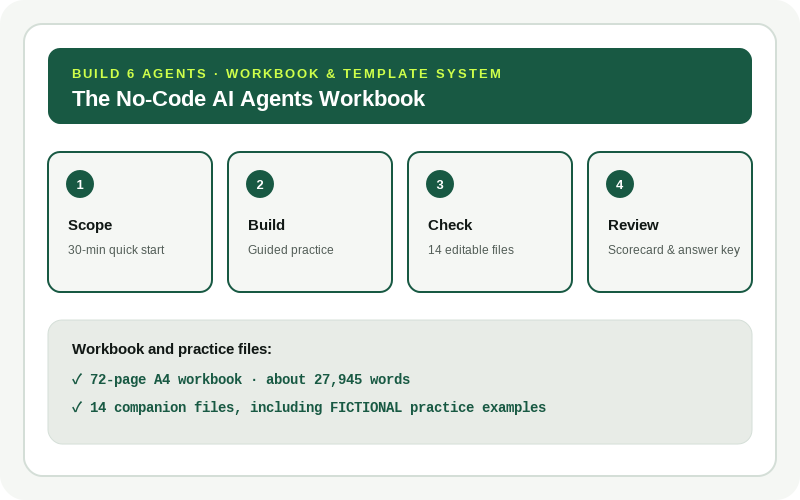
- ScopeDefine one job, permitted data and expected output
- BuildConfigure a supported model and the minimum needed tools
- CheckValidate structure, evidence, permissions and duplicate handling
- ReviewRecord actual test results and rehearse pause and handoff steps
What you'll be able to do
Practice six assistant workflows with clear inputs, draft outputs and acceptance checks. Run and review them in your own account before enabling live work.
Is this book right for you?
Build six assistant workflows and learn how to check their work.
Useful for complete workflow specifications, test inputs and acceptance records. It fits someone prepared to test their actual tools and review failures.
Skip if you expect a working autonomous agent without account configuration or oversight. Free platform docs cover their current controls.
Practice six assistant workflows with clear inputs, draft outputs and acceptance checks. Run and review them in your own account before enabling live work.
Added buyer-guide/ contains an authored fictional source, complete reference decision, deliberate fault and editable review record. Existing tools, sources and licences remain. A file/score/template is not a verified real-world outcome.
Practice outcome
Practice inbox classification and reply drafts with no send action
Practice outcome
Research inbound leads from approved evidence and record unknowns
Practice outcome
Draft five content formats from one reviewed source
Practice outcome
Practice cited document answers and explicit knowledge gaps
Practice outcome
Extract proposed meeting tasks with review for missing dates or owners
Practice outcome
Write a weekly report from independently checked metrics
What you can inspect
- Twelve complete draft prompts; eleven copy the corresponding manuscript boxes and one adds evidence review.
- All ten original companion names retained; ten-case triage logs start UNTESTED.
- Ten modules, six assistant builds and forty corresponding self-check answers. Offline file/schema checks are separate from live account testing.
What's inside
- 74-page revised workbook; ten modules and 28,146 extracted words
- no-code-ai-agents-workbook-templates.zip: 14 companion files, retaining all ten original filenames and adding a fictional proposal, file map, six schema objects and twelve structural exercises. Cases and examples do not establish live account execution.
- Added buyer guide: specific paid-versus-free judgment, finished fictional comparison case, existing starter-file route and editable review record
Chapters
- 01Start here
- 02The 30-minute quick start
- 03Module 1: Choosing Your Builder: n8n vs Zapier vs Make
- 04Module 2: System Instructions and Prompts for Agents
- 05Module 3: Agent 1: Inbox Triage and Draft Replies
- 06Module 4: Agent 2: Lead Enrichment into a Sheet or CRM
- 07Module 5: Agent 3: Content Repurposer (One Post into Five Formats)
- 08Module 6: Agent 4: FAQ and Knowledge Bot Over Your Own Docs (RAG Explained Simply)
- 09Module 7: Agent 5: Meeting Notes to Actionable Tasks
- 10Module 8: Agent 6: Weekly Operations Report Agent
- 11Module 9: Testing, Guardrails, Privacy, and Human-in-the-Loop
- 12Module 10: Packaging No-Code Agents as a Client Service
- 13Your 14-day plan
- 14Capstone and scorecard
- 15Answer keys
- 16FAQ
- 17Glossary
- 18Sources
- 19Changelog
Read a free sample
No email needed. This is the book's real text, unedited.
Start here
Build and test six no-code assistant workflows in a builder you can access. Each lab gives you a job, input, output and acceptance check. A workflow is ready for use only after your own account tests pass.
Most automation guides show you how to move a row from a form into a spreadsheet. That is useful, but it breaks the moment a customer writes an email in an unexpected format or asks two questions at once. Standard automations follow rigid rules. If column A equals "Urgent", send a Slack message. If it does not match the exact word, the workflow stops or takes the wrong path.
An AI agent works differently. You give it a goal, a set of instructions, a short-term or document memory, and permission to use specific tools. When a trigger fires, the agent reads the incoming data, decides which tool it needs, runs that tool, checks the result, and prepares the final output. You do not need to write Python or JavaScript to build one. Modern visual builders like n8n, Zapier Agents, and Make AI Agents give you drag-and-drop blocks for every part of this loop.
Who this book is for
This workbook is built for non-technical operators who want practical assistants that save desk time every week:
- Solopreneurs and freelancers who handle their own inbox, lead tracking, content drafting, client meeting notes, and weekly reporting.
- Small-team operations managers (2 to 15 people) who need to standardize how incoming requests, customer questions, and internal handoffs get processed without hiring a software engineer.
- Virtual assistants and automation consultants who want a clear, structured method to scope, build, test, and document no-code AI assistants for small business clients.
Who this book is NOT for
Read this list before you spend time on the labs. This book is the wrong fit if you belong to any of these groups:
- Software engineers looking for code frameworks: We do not cover Python, TypeScript, LangGraph, CrewAI, AutoGen, or raw SDK code. Every lab uses visual interfaces in n8n, Zapier, and Make.
- People looking for a "push-button passive income" scheme: This workbook teaches a technical and operational skill. It does not promise that you will make money, land clients overnight, or replace an entire staff with a single prompt.
- Enterprise compliance architects: While we cover practical data privacy, API cost caps, and human approval steps for small businesses, we do not cover custom HIPAA, SOC 2, or on-premise air-gapped Kubernetes deployments.
Time needed
Allow 10 to 15 hours for the ten modules, plus setup, retries and the capstone. Plan roughly 14 to 20 hours over 14 days; account access problems can take longer. If you prefer to work in weekend blocks, you can complete the entire workbook across two full weekends.
What you need before you start
You do not need to buy expensive software subscriptions to complete the labs in this book. You need three things:
- One visual builder account: You can use n8n (either the cloud trial or the free self-hosted community edition with a supported Docker installation), Zapier (which includes a free tier for testing Zaps and Zapier Agents), or Make (which offers plan-specific monthly credits). Module 1 helps you pick the best primary tool for your daily work. The labs provide a common architecture and the most detailed path in n8n; Zapier and Make controls vary by account and migration state. Check permissions and available actions before committing to a route. The download contains design instructions, not tested import-ready workflows for all three builders.
- One AI model API key: Most visual builders let you connect an OpenAI API key (
platform.openai.com) or an Anthropic API key (console.anthropic.com). Zapier Agents and Make also offer built-in model credits on certain tiers, though bringing your own API key gives you direct control over model selection and token spend. - Free workspace apps for testing: We use Google Sheets, Gmail (or a test inbox), Google Docs, and Slack or Discord for our triggers and outputs. Check that your account permits the required OAuth scopes and actions; organizational policy can block a connector even on a paid account.
[!WARN] Cost and pricing note Software vendors change their plan names, free tier quotas, and token rates frequently. Throughout this book, whenever we discuss platform limits or API costs, we note our check date (checked November 2026) and direct you to check the vendor's current pricing page before you turn on a workflow that runs hundreds of times per day. Start with a small manual test and check actual usage after it. A budget alert does not stop requests. If your provider offers an enforced spending limit, enable it and check its scope; also limit workflow runs and retries.
Reading the output examples
The prompt boxes sometimes show alternatives with | and type names such as boolean. Those are field descriptions, not valid JSON to paste into a parser. Build the parser schema with actual types, enums and nullable fields, or start from one valid example and then add constraints. Inspect a run before mapping downstream fields. Validate the values again before any write. Prompt instructions alone do not enforce a schema or permission boundary.
Parser practice files
Open templates/13-output-schemas.json and select the one named schema matching the exercise. Copy only that schema object into a compatible parser; the file wrapper is not itself an output schema. There are schemas for the quick start and Agents 1, 2, 3, 5 and 6. Agent 4 returns cited plain text. The twelve hand-authored examples in templates/14-schema-practice-fixtures.json include structurally valid and invalid data. They are not model results. In particular, S07 passes structure while failing editorial requirements, showing why schema validation cannot replace checking the answer.
Start with the quick-start sample. Compare Support_Urgent, integer priority 1 and the summary against its input. The older shorthand Pricing and High belongs to a different example and must fail this schema. Keep rejected data out of your sheet. Word counts, exact dates, source evidence and recipient permissions need separate checks.
How to use this workbook
Do not read this book from cover to cover on a tablet without touching a keyboard. It is a workshop manual.
- Start with the quick start: Use manual fictional samples to learn the input, model, validation and sheet mapping. Thirty minutes is a practice target; account setup and troubleshooting can take longer.
- Read Modules 1 and 2 before skipping to the agents: Module 1 stops you from picking the wrong platform. Module 2 gives you the five-block system prompt structure that all six agents rely on.
- Use the companion templates: Inside your download folder, open the
templates/directory and readtemplates/12-file-map.md. Start with the blank and fictional Agent Briefs and Test Case Sheets. The prompt library contains copyable draft instructions; the cost tracker is a fictional arithmetic example. These files do not record completed account tests. Fill out an Agent Brief before you drag a single node onto your canvas. - Never skip the "Done when" check or the test cases: An untested agent is a liability. Every lab ends with a specific test condition and a troubleshooting guide (
If this happens). Run the bad-input tests on purpose to watch how your guardrails catch errors.
The 30-minute quick start
Allow a first practice block of about 30 minutes once your accounts are ready. Build a single-purpose Morning Inbox Prioritizer that reads a sample customer message, classifies its intent, assigns a priority score from 1 to 3, and writes a clean summary line into a Google Sheet.
Manual trigger -> Sample message -> Classify -> Validate fields -> Log result
Step 1: Check spending controls before connecting a key (5 minutes)
Before connecting a key, check whether your account has an enforced limit or only spending alerts. Alerts notify you; they do not stop a loop. Keep the workflow on manual triggers during this exercise and set a retry limit before scheduling it.
- Log in to your OpenAI API Platform dashboard (
platform.openai.com) or Anthropic Console (console.anthropic.com). - Open Settings, then click Billing or Limits.
- Set a small test budget and an alert. In OpenAI project Limits, enable Enforce a hard limit if that control is available to your account role. Read the confirmation so you know which requests it covers. For another provider, use its own spending controls; do not assume the same setting exists. See the official spend limits guide (opens in a new tab).
- Generate a new secret API key named
IncomeLab-Workbook-Testand copy it to your password manager.
Step 2: Create your tracking sheet (5 minutes)
- Open Google Sheets and create a new spreadsheet named
QuickStart - Triage Log. - In Row 1, type these five column headers from A1 to E1:
TimestampSenderCategoryPriorityOne_Line_Summary
Step 3: Build the flow in your chosen tool (15 minutes)
Pick one of the three builders below to run this quick start.
Option A: In n8n
This quick start classifies one message without selecting tools, so use Basic LLM Chain. Keep the tool-calling AI Agent node for the later builds; n8n requires at least one tool connection on that node.
- Create a workflow with Manual Trigger. Leave it unpublished while testing.
- Add Edit Fields (Set) with string fields
sender=alex@example.comandbody=We cannot log into our project portal before our 2 PM presentation today. Please help.Preserve those fields for later mapping. - Add Basic LLM Chain. Set the prompt source to Define below. Map
senderandbodyinto Prompt (User Message) from the incoming item. - Under Chat Messages, add a System message and paste the Quick Start Triage instruction below. Attach a Chat Model with an account-supported model and your test credential. Confirm current availability and pricing instead of relying on an older model name.
- Enable Require Specific Output Format and attach Structured Output Parser. Generate its schema from this valid JSON example:
{"category":"Support_Urgent","priority":1,"summary":"Client cannot access project portal before today's presentation."}
- Execute through the chain first. Inspect the actual parsed output path; builders and node versions may wrap it in
outputortext. Map fields from the visible result rather than typing an assumed path. Check category against the four allowed values, priority against integers 1–3, and summary against the 15-word limit. A generated schema does not enforce every business rule. - Add a required-input filter before the chain: reject an empty sender or body to a review log without a model call. Add Google Sheets: Append Row in Sheet after output validation. Map the execution timestamp, original
sender, and parsedcategory,priority,summaryto all five columns. Stop and inspect an invalid response rather than writing an unchecked row. Run once, inspect the sheet, then change only the sample body and repeat.
Option B: In Zapier
- Open Zapier and create a Zap. Use AI by Zapier for the classification step; this exercise does not require agent tool calling. Keep the Zap unpublished during sample tests.
- For a standard Zap, choose Schedule by Zapier (set to trigger daily, which we will test manually) or Webhooks by Zapier.
- Add AI by Zapier and configure typed input and output fields for this classification task. Account interfaces may differ during the Agents migration; use the current action available in your editor.
- Paste the system prompt from the
[!PROMPT]box below and supply the sample email text from Step 3 Option A. - Define the output fields:
category(string),priority(integer), andsummary(string). - Add a Google Sheets -> Create Spreadsheet Row step and map the extracted fields to your columns.
Option C: In Make
- Click Create a new scenario in Make.
- Add a Tools -> Set multiple variables module as the first step. Create
senderandbodyusing the sample text from Option A. - Add the current OpenAI text-generation module available to your account. The quick start is a fixed classification step, so it does not need Make AI Agents: Run an agent or tool selection.
- Select your model, set the Response Format to JSON Object or JSON Schema, and paste the system prompt below.
- Inspect the response. If the JSON is returned as text, insert JSON: Parse JSON using the example fields before mapping them. Validate the allowed category and priority, then add Google Sheets: Add a Row. Map timestamp, original sender, category, priority and summary to all five columns. Use Run once and leave scheduling off during practice.
[!PROMPT] Quick Start Triage System Instruction You are an operations triage assistant. Read the incoming email sender and body, then return a JSON object with exactly three keys:
- "category": Choose one of ["Support_Urgent", "Billing", "Sales_Inquiry", "General_Low_Priority"].
- "priority": An integer from 1 to 3, where 1 means immediate same-day action required, 2 means reply within 24 hours, and 3 means informational only.
- "summary": A plain-English summary of the request in 15 words or fewer. Rules:
- Do not invent facts that are not in the message.
- If the message mentions a blocked deadline today or a broken login, set priority to 1.
[!TRY] Lab 0: Run your 30-minute quick start (5 minutes)
- Click Test step or Test workflow in your builder.
- Watch the execution log to confirm the AI step outputs structured fields (
category,priority,summary) rather than a chatty paragraph.- Switch to your
QuickStart - Triage LogGoogle Sheet and inspect Row 2.- Change the sample
bodytext to a newsletter promotional email ("Save 20% on summer office chairs this week!") and run the test a second time.
[!DONE] Your Google Sheet contains two test rows: Row 2 shows
Support_Urgentwith priority1, and Row 3 showsGeneral_Low_Prioritywith priority3.
Version 1.0-r20261109 · changelog
- 1.0 (8 November 2026): First verified release with companion templates and labs. 9 November 2026: revised practical walkthrough, editorial corrections and checked local deliverables.