Loading ebook details...
AI / No-code apps
Vibe Coding for Non-Coders
Five small web-app builds with prompts, checks and recovery steps
5.0(74)
|Editorial review 4.5/5The problem
Traditional coding takes months to learn, while conversational AI builders often trap beginners in broken loops or burn credits on the last 10% of features.
Who it's for
Non-programmers, freelancers, small business owners, and creators who want to build functional web apps and tools without writing syntax.
The method
One-Page Spec -> Conversational Prompt Loop -> Mobile Verification -> Git Rollback -> Custom Domain Launch
Inside this book
- 19chaptersOne method, explained step by step
- 30day planA small action for every day
How the method works
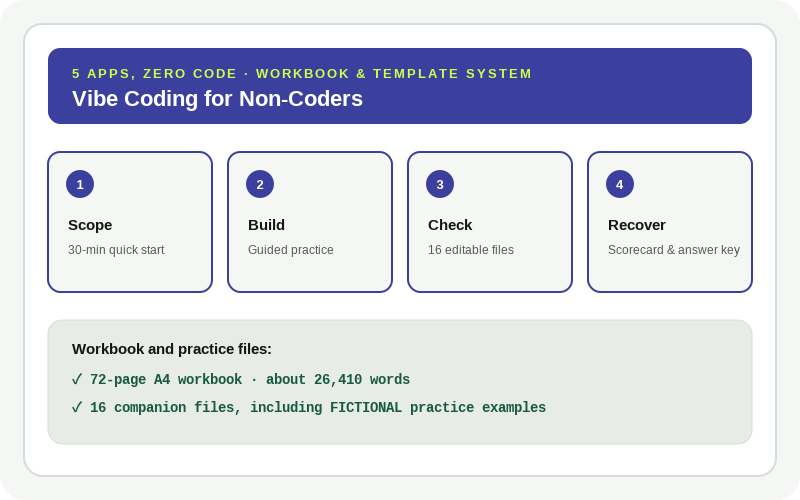
One-Page Spec -> Conversational Prompt Loop -> Mobile Verification -> Git Rollback -> Custom Domain Launch: the path the book takes you through, step by step.
- ScopeWrite the job, permitted data and exclusions
- BuildGenerate one small slice with a named output
- CheckCompare behavior with fixed inputs and actual account evidence
- RecoverSave a known-good state and verify what restoration includes
What you'll be able to do
Practice five small web-app designs with explicit formulas, input/output checks and staged changes. Configure and test your own account before collecting real records or sharing a deployment.
Is this book right for you?
Build small web apps and learn how to check what they do.
Useful for small scoped app exercises with explicit input/output checks. Choose it for learning; the Micro-SaaS book addresses a broader release candidate.
Skip if you need a production developer or expect generated code to be secure and ready without review. Free framework documentation may cover one isolated control.
Practice five small web-app designs with explicit formulas, input/output checks and staged changes. Configure and test your own account before collecting real records or sharing a deployment.
Added buyer-guide/ contains an authored fictional source, complete reference decision, deliberate fault and editable review record. Existing tools, sources and licences remain. A file/score/template is not a verified real-world outcome.
Practice outcome
Practice a public link page with tested contact/share fallbacks
Practice outcome
Verify booking persistence and failure states with fictional records
Practice outcome
Compare quote line items and print output with a stated rounding rule
Practice outcome
Test a self-service portal using separate owned identities and direct requests
Practice outcome
Compare a dashboard with fifteen supplied fictional orders and source totals
What you can inspect
- All nine original companion filenames and all ten teaching modules retained.
- Thirty draft prompts, thirty-eight corresponding answers and a fifteen-row fictional dashboard fixture.
- Twenty-six offline reference arithmetic/input checks pass. Eighteen app and sixteen access cases remain UNTESTED; no live builder or independent-reader result is claimed.
What's inside
- 74-page revised workbook; ten modules and 26,617 extracted words
- vibe-coding-for-non-coders-templates.zip: 16 companions, retaining nine original filenames; includes thirty draft prompts, reference math, twenty-six fixed cases, fictional order data and planned access checks.
- Added buyer guide: specific paid-versus-free judgment, finished fictional comparison case, existing starter-file route and editable review record
Chapters
- 01Start here
- 02The 30-minute quick start
- 03Module 1: What Vibe Coding Is, Where It Shines, and Where It Breaks
- 04Module 2: Build 1 - Link-in-Bio and Micro-Landing Page (Lovable or Bolt.new)
- 05Module 3: Build 2 - Booking Request and Waitlist Form with a Real Database (Lovable + Supabase)
- 06Module 4: Build 3 - Interactive Quote and Pricing Calculator (Bolt.new)
- 07Module 5: Build 4 - Client Portal and Resource Directory with Login (Lovable + Supabase Auth)
- 08Module 6: Build 5 - Internal Business Dashboard from a Spreadsheet (Replit Agent)
- 09Module 7: Debugging Without Code (Screenshots, Console Logs, and Rollbacks)
- 10Module 8: Credit Budgeting and Stopping Token Burn
- 11Module 9: Security and Privacy Basics for Non-Coders
- 12Module 10: Deploying to a Custom Domain and Knowing When to Hire a Developer
- 13Your 14-day plan
- 14Capstone and scorecard
- 15Answer keys
- 16FAQ
- 17Glossary
- 18Sources
- 19Changelog
Read a free sample
No email needed. This is the book's real text, unedited.
Start here
Practice five small web-app builds using plain-English prompts, explicit rules and recorded checks. Configure and test the account-specific steps before sharing a live version; this workbook does not establish that an app is secure merely because it runs.
In February 2025, AI researcher Andrej Karpathy coined the phrase "vibe coding" to describe building software by talking to an AI and letting it write all the files. Nine months later, Collins Dictionary named "vibe coding" its 2025 Word of the Year. That happened for a simple reason. The useful idea is to describe a small tool in plain language, inspect the generated behavior and keep evidence for each check. An attractive preview is not proof of a working backend.
There is a catch that social media demos leave out. The first 80 percent of an AI-built app feels like magic. The last 20 percent can turn into a frustrating loop where every prompt breaks two other buttons, burns through your monthly credits, or leaves your database wide open to strangers.
This manual gives you a repeatable system to get past that wall. You will learn how to write a one-page app specification before you touch the chat box, how to build one small slice at a time, how to roll back bad changes in seconds, and how to lock down your data before you share a link.
Who this book is for
- Freelancers and consultants who want custom calculators, intake forms, or a simple client portal without paying a software agency.
- Small business owners and operators who want to turn messy spreadsheets into clean internal tools or booking pages.
- Creators and solo founders who want to test a web app idea with real users before spending thousands of dollars on engineering.
- Non-technical office workers who understand their business rules clearly in plain English and want to build small browser tools that save time.
Who this book is NOT for
- Professional software engineers looking for advanced IDE workflows in Cursor, Windsurf, or Claude Code.
- People building high-risk or regulated software, such as medical record systems, banking apps, custom payment processors, or tools that store government ID numbers.
- Anyone expecting a one-click business in a box. This book teaches you how to build and ship five practical web apps. It does not promise that users will buy your app or that you will make money from it.
- Builders who want native mobile apps for the Apple App Store or Google Play Store. Every project in this book is a mobile-friendly web app that runs in a standard browser.
Time needed
Plan an initial 12 to 15 hours over fourteen days, plus time for account setup, failed tests and review. Database permissions, recovery and deployment can take longer than the practice blocks shown in the labs.
What you need before you start
You need a desktop or laptop computer with a modern browser (Chrome, Edge, Brave, or Firefox) and a stable internet connection. You do not need to install Python, Node.js, or any code editor on your machine.
You will use the following web services across the five builds. Tool prices, free tiers, and credit limits change often. Always check the current pricing page for each tool before paying. The list below names the intended services; confirm the actual account features and current plans. The revision checks in Sources are scoped observations, not a verification of every plan detail:
- Lovable (
lovable.dev): Offers a free starter tier with a small daily message allowance and paid monthly plans with larger credit pools, private projects, and custom domain support. Check the current pricing page athttps://lovable.dev/pricing(checked November 2026). - Bolt.new (
bolt.new): Offers a free tier with daily and monthly token limits and Pro plans with higher token allowances and Netlify or custom domain features. Check the current pricing page athttps://bolt.new(checked November 2026). - Replit (
replit.com): Offers a free starter tier to explore the workspace and paid Replit Core or Teams plans that include monthly usage credits for Replit Agent and live deployments. Check the current pricing page athttps://replit.com/pricing(checked November 2026). - Supabase (
supabase.com): The open-source database and login service used by Lovable and Bolt.new. Supabase offers a free tier that covers up to two active projects and paid plans for production backups and higher limits. Check the current pricing page athttps://supabase.com/pricing(checked November 2026). - A Google Sheets or Excel program: Any spreadsheet tool that can export a
.csvfile for Build 5. - Optional custom domain: A plan-dependent annual charge from registrars like Cloudflare Registrar, Namecheap, or Porkbun if you want to put your final app on your own web address in Module 10.
[!TIP] You do not need to pay for all three AI builders at once. Start on the free tiers of Bolt.new and Lovable for the Quick Start and Builds 1 through 3. Decide which interface fits your brain best before you buy a one-month starter subscription for your heavier builds.
How to use this book
Every module follows the same rhythm. First, you read a short explanation of the concept and look at the process flow. Next, you follow numbered steps and study a hypothetical worked example. Then you copy and adapt the ready-made prompts, complete a timed hands-on lab, fill out your planning worksheet, and test yourself with the self-check questions.
Keep your templates/ folder open beside your browser and start with templates/15-start-and-file-map.md. It contains blank and filled app specs, a library of 30 draft prompts, bug report templates, a credit-tracker CSV containing editable values, not an automatic billing calculator, and pre-launch security checklists.
The 30-minute quick start
Start with a small browser calculator. Thirty minutes is a practice target after account setup, not a guaranteed build or release time.
Your goal is to build a Freelance Meeting Cost & Scope Estimator in Bolt.new (or Lovable) and put it on a live preview link you can open on your phone. It needs no database and no login. Everything in this quick start runs inside the browser. For comparison with the supplied reference, use rates from 15 to 500 USD in whole cents, 1–20 attendees, 0–24 hours in whole minutes and 0–120 whole prep minutes per person. Reject invalid/negative values and round the final cost to cents. These are practice bounds, not recommended business rates.
Open builder -> One screen -> Test math -> Fix one detail -> Review release -> Test phone
[!TRY] Quick Start Lab: Ship a single-screen calculator in 30 minutes
- Minute 0 to 5: Open your workspace. Go to
https://bolt.neworhttps://lovable.devin your browser and sign in with a free account. Make sure you are looking at the main prompt box on the home screen.- Minute 5 to 10: Paste the starter prompt. Copy the prompt in the
[!PROMPT]box below and paste it into the chat box. Press Enter and watch the AI write the files and start the live preview on the right side of your screen.- Minute 10 to 18: Test the math by hand. When the preview appears, set the hourly rate to 100, the number of attendees to 4, and the duration to 90 minutes and prep time to zero. Check
100 x 4 x 1.5 = 600. Then set prep time to 15 minutes:100 x 4 x (105 / 60) = 700. A test that leaves the default prep time at 15 must not expect 600. Click the "Copy Summary" button and paste the text into a blank note to make sure the button works.- Minute 18 to 25: Make one targeted refinement. Keep the selected rate; set preset duration/attendees/prep to 15/3/0, 60/4/15 and 240/8/30 respectively. Send one follow-up prompt: "Add three quick preset buttons at the top: 'Quick 15-min Standup', '1-Hour Client Kickoff', and 'Half-Day Workshop'. Use the explicitly specified duration, attendee and prep values; do not invent preset inputs." Test all three preset buttons.
- Minute 25 to 30: Publish to a shareable link. In Bolt.new, click the Publish or Deploy button in the top right corner (in Lovable, click Publish in the top right). Check the actual publication result rather than relying on a fixed wait. Send that link to your phone and tap the preset buttons on your mobile screen.
[!PROMPT] Quick Start: Single-screen Meeting Cost Calculator Build a clean, mobile-friendly single-page web app called "Meeting Cost Calculator" for freelancers and small agencies.
Use a light background (
#f8fafc), dark slate text (#0f172a), and a deep indigo accent color (#3b3f9e). No login and no database required.Include these exact inputs in a left card (or top card on mobile):
- Number of people in the meeting (slider and number input, from 1 to 20, default 4).
- Average hourly rate per person in USD (number input, from 15 to 500, default 85).
- Meeting length in minutes (buttons for 15, 30, 45, 60, 90, 120, plus a custom minutes input, default 60).
- Prep time per person in minutes (number input, from 0 to 120, default 15).
- Frequency (dropdown: One-time, Weekly, Bi-weekly, Monthly).
Include these outputs in a right results card:
- Total cost of this single meeting (including prep time) in large bold text.
- Annualized cost using explicit fictional planning assumptions: Weekly = 50 occurrences, Bi-weekly = 25, Monthly = 12; One-time shows no annualization. Round the per-meeting cost to cents first and multiply that displayed amount. These are planning assumptions, not observed work calendars.
- A plain-English verdict badge: Under 200 USD shows a green badge ("Low-cost sync"), 200 to 600 USD shows an amber badge ("Send an agenda first"), and over 600 USD shows a red badge ("Could this be an async memo?").
- A working "Copy Meeting Summary" button that copies a clean 4-line text summary to the clipboard and changes its button label to "Copied!" for 2 seconds.
[!DONE] You have a live URL open on your phone, the calculator math matches
people x rate x ((meeting_minutes + prep_minutes) / 60), and the "Copy Meeting Summary" button copies the exact numbers to your clipboard.
Notice why the scope is easier to test. You did not ask the AI to "build a full agency project management platform." You gave it exact inputs, exact math rules, exact visual colors, and an explicit rule that no database or login was needed. Every successful build in this book uses that exact discipline.
Version 1.0-r20261109 · changelog
- 1.0 (8 November 2026): First verified release with companion templates and labs. 9 November 2026: revised practical walkthrough, editorial corrections and checked local deliverables.