Work From Home
Home Office Setup in 2026: Three Budgets, an Ergonomic Checklist and a $392 Sample Build
How much a home office really costs in 2026, with basic, mid and premium budgets, a $392 ergonomic sample build, ergonomic rules, and what to buy first.
By Md Mahfuj HossainPublished 5 min read

Quick answer: A workable home office can cost about $50 if you already own a laptop, around £700 to £900 for a solid desk-and-chair setup, or £2,000 to £3,000 for a premium full office, according to one UK guide. For a freelancer building an ergonomic setup from scratch, a 2026 guide estimates about $340 to $470, with a sample build at about $392. Spend first on your chair, monitor height and keyboard/mouse, because they affect comfort most.
Key takeaways
- Chair first. Adjustable lumbar, armrests and seat height matter more than a fancy desk.
- Screen at eye level. Laptop users need an external keyboard and a riser.
- Lighting and noise are underrated productivity upgrades.
- Move every 45 to 60 minutes.
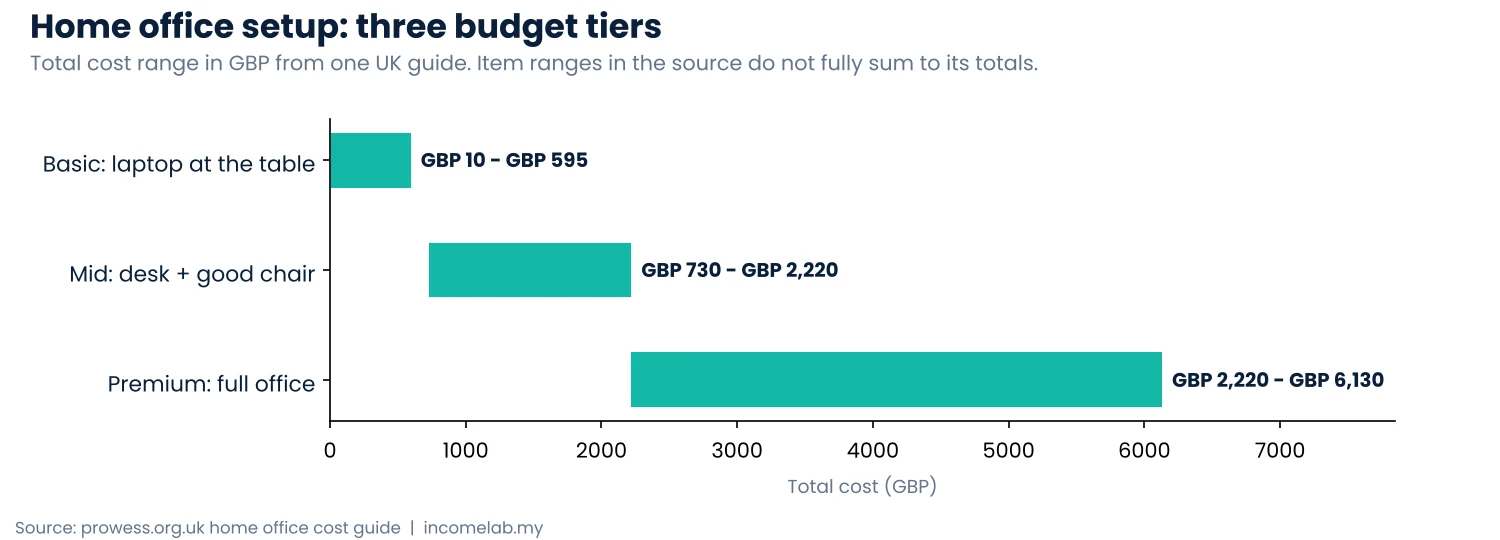
Figure 1. Total cost ranges (GBP) from one UK guide. The source's item ranges do not fully sum to its totals, so treat totals as estimates.
The three budget tiers
| Tier | Total (GBP) | Typical contents |
|---|---|---|
| Basic: "laptop at the table" | £10 to £595 (often about £50 if you own a laptop) | Laptop stand or books, external mouse, cushion, earbuds |
| Mid: "desk and comfortable chair" | £730 to £2,220 (most end up at £700 to £900) | 120 to 160 cm desk £100 to £300; chair £50 to £450; monitor £100 to £300; keyboard and mouse £30 to £80; monitor arm £35 to £90; lamp £20 to £60 |
| Premium: "full office" | £2,220 to £6,130 (many at £2,000 to £3,000) | Standing desk £150 to £1,500; premium chair £250 to £1,100+; monitors £300 to £900+; sound fixes £80 to £200 |
A $392 ergonomic sample build
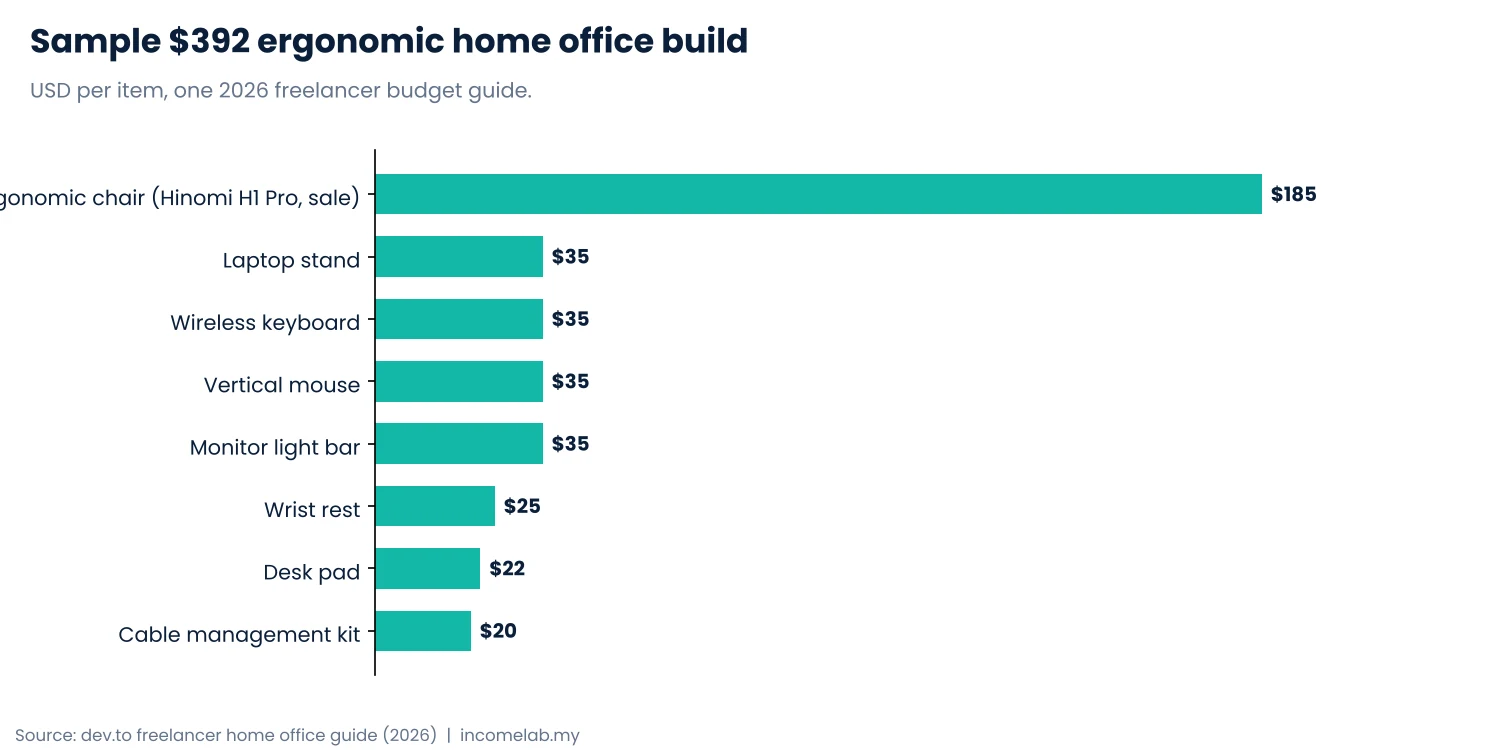
Figure 2. One 2026 freelancer guide's sample build totalling about $392.
| Item | Cost |
|---|---|
| Ergonomic chair (on sale) | $185 |
| Laptop stand | $35 |
| Wireless keyboard | $35 |
| Vertical mouse | $35 |
| Monitor light bar | $35 |
| Wrist rest | $25 |
| Desk pad | $22 |
| Cable management kit | $20 |
| Total | about $392 |
The same guide lists the typical budget range per category: chair $180 to $220, stand $30 to $50, keyboard and mouse $60 to $90, lighting $30 to $50, desk pad and wrist rests $25 to $35, cables $15 to $25, giving about $340 to $470 overall.
Ergonomic rules that actually matter
| Area | Guideline |
|---|---|
| Chair | Adjustable lumbar and armrests; feet flat; seat depth supports thighs |
| Desk height | Typically 28 to 30 inches; elbows near 90 degrees |
| Monitor | At arm's length; top of screen at or just below eye level |
| Laptop | Use an external keyboard and a riser to avoid looking down |
| Wrists | Rest between typing; float while typing |
| Lighting | Natural light from the side, not behind or in front of the screen |
| Habits | 20-20-20 eye rule; stand or move every 45 to 60 minutes |
What to buy first (priority order)
- Chair that fits you.
- External keyboard and mouse plus a laptop riser.
- Monitor (24 to 27 inch) or a second screen.
- Lighting to cut eye strain.
- Headset or mic for calls.
- Standing desk (optional, about $300 to $350 on sale for an entry model in one guide).
Home office for video calls and client work
| Need | Low-cost fix |
|---|---|
| Sound | Rug, curtains, door seal, headset |
| Camera | Laptop webcam raised to eye level; phone as webcam with a mount |
| Background | Plain wall, shelf, or blur |
| Backup internet | Phone hotspot or an eSIM; see our eSIM comparison |
Tax and expenses
Some countries allow a deduction for a dedicated home office or equipment. Rules vary widely, so ask a local tax professional before claiming. Keep receipts.
Illustrative example (not a real person)
A new freelancer with a $400 budget spends $185 on a chair, $35 on a laptop riser, $70 on a keyboard and mouse, $35 on lighting, and $75 on a headset and cables. It is a sensible structure rather than a promise that these exact products will suit you.
Working from a small space
- Use a fold-down or wall-mounted desk.
- Keep a dedicated "work corner" to separate work and rest.
- Shut down your laptop at a set time.
Frequently asked questions
How much does it cost to set up a home office?
From about £50 if you own a laptop to £6,000+ for premium. A typical mid setup is £700 to £900 in one UK guide; an ergonomic freelancer setup is about $340 to $470.
What do I need for a basic home office?
A laptop, stable internet, a laptop stand, external mouse and keyboard, a supportive chair or cushion and good lighting.
Is a standing desk worth it?
It can help if you tend to sit all day, but moving regularly matters more than the desk. Entry models were about $300 to $350 on sale in one guide.
What is the best chair for working from home?
One that offers adjustable lumbar support, armrests and seat height. Try before you buy if possible.
How high should my monitor be?
At arm's length with the top of the screen at or slightly below eye level.
Do I need two monitors?
Not required. They help with multitasking; a single good monitor plus a laptop riser is enough for many.
How can I make my home office quieter?
Use a rug, curtains, a door seal and a headset. A premium setup budgets £80 to £200 for sound fixes in one guide.
Can I claim a home office on tax?
Possibly, depending on your country and employment status. Check with a local tax professional.
What is the 20-20-20 rule?
Every 20 minutes look at something 20 feet away for 20 seconds to reduce eye strain.
What is the cheapest way to improve my setup?
A laptop stand and external keyboard and mouse, plus better lighting, usually deliver the biggest comfort gain per dollar.
Sources
- Best ergonomic home office setup for freelancers under $500, DEV Community (opens in a new tab)
- What does it really cost to set up a home office, Prowess (opens in a new tab)
Prices checked October 2026 from third-party guides and vary by region and retailer. This is general information, not medical or tax advice.
- home office
- ergonomics
- work from home
- setup
- budget
Keep reading
Work From Home
How to Spot Work-From-Home Scams in 2026: 12 Red Flags, Task Scams and What to Do If You Were Targeted
Learn the red flags of fake work-from-home jobs, how task scams work, how to verify an employer, and what to do if you have already paid or shared details.
Work From Home
Remote Jobs With No Experience in 2026: 25 Entry-Level Roles, Pay and How to Get Hired
A practical guide to entry-level remote jobs in 2026, with approximate pay for 25 roles, the skills each needs, how to build a first-job profile, and how to avoid scams.

Work From Home
Remote vs Hybrid vs In-Office Work in 2026: Productivity, Pay, Costs and Who Each Suits
A balanced comparison of remote, hybrid and in-office work in 2026: what research says about productivity and retention, costs, career trade-offs and how to choose.

Work From Home
Work From Home Productivity Guide 2026: Schedules, Focus Blocks, Tools and Boundaries That Work
A practical guide to staying productive when working from home: a daily schedule, focus-block method, tool stack, boundary rules and a comparison of common techniques.